What to Expect and What Not to Expect From a Free Music Download Site
Most write-ups of free tools read like sales pages: every feature is a breakthrough, every limitation is quietly skipped. This is not that. What follows is a plain, fair-minded assessment of mp3juices.art, a free music search and download site, written for people who have been burned by overpromising reviews before. The short answer: it does a few things well, asks nothing of you in return, and will not replace a paid streaming subscription. Knowing which is which saves you time.
The Honest Strengths: What the Site Actually Delivers
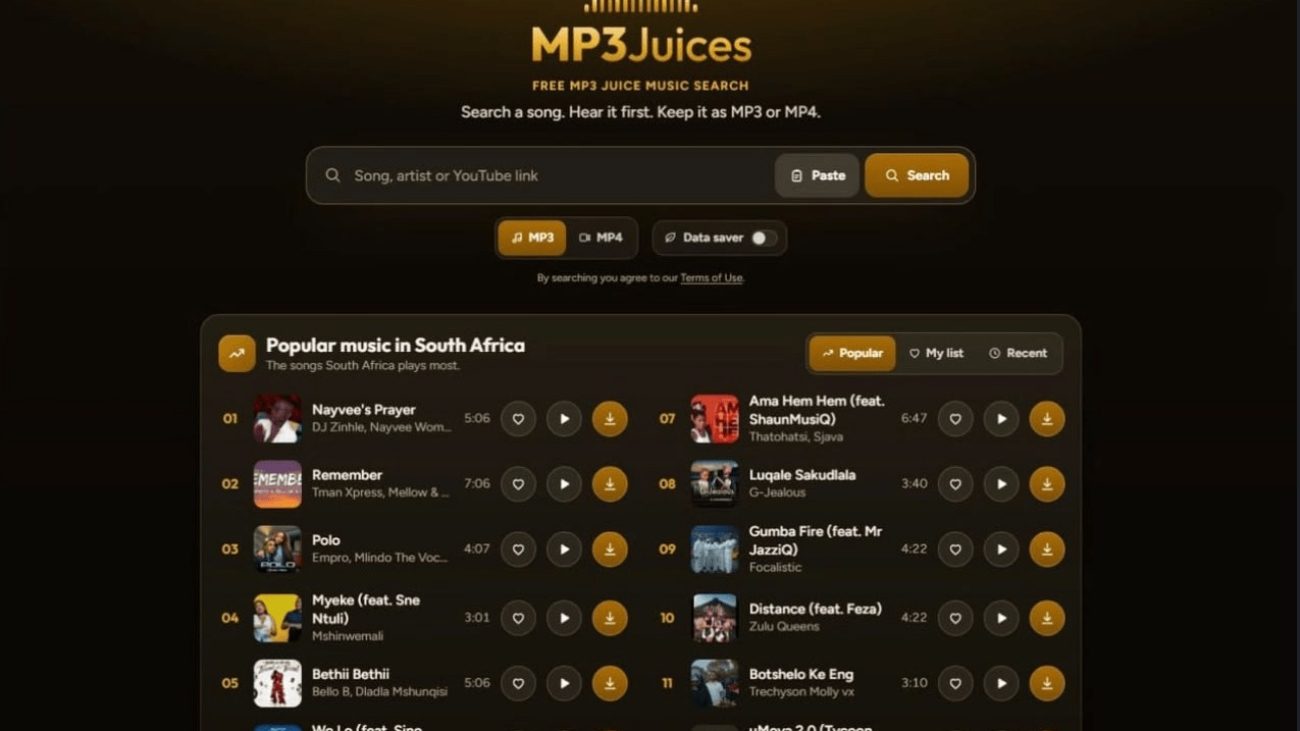
The core promise is simple and largely kept. You type a song, artist, or album into the search bar, get results, preview a track, and then choose to download it as an MP3 or MP4 file. No account, no installation, no email address. For a quick, one-off download, that friction-free flow is the real value.
No sign-up is required to search or download. That matters more than it sounds. Many “free” tools hide the actual download behind registration, app installs, or a paywall that appears at the last click. Here, the path from search to file stays short.
Preview before you commit
You can listen to a song before downloading it. This is a small feature with outsized practical value: it lets you confirm you have the right version, remix, or live recording before you spend time and storage on a file. If you have ever downloaded three wrong versions of the same track, you will appreciate it.
Browsing beyond the search bar
The site is not only a search box. You can browse by genre and by artist, and there is a charts section for seeing what is popular. A personal list feature lets you keep track of things you want to revisit, and a data saver mode is available for people on limited connections. These are modest conveniences, but they make the site feel more like a music discovery space than a bare download utility.
Format choice: MP3 or MP4
Being able to choose between audio and video formats covers the two most common use cases: a song for offline listening, or a music video clip for keeping. It is not an exotic feature, but it is the right one.
Where Expectations Should Be Tempered
This is the part most reviews leave out. A free site operates under constraints that paid services do not, and pretending otherwise sets you up for disappointment.
It is a search and download tool, not a streaming service
Do not expect a Spotify-style experience: no curated playlists, no personalized recommendations, no high-fidelity audio guarantees, no syncing across devices. The site helps you find and save files. Treat it as a utility, not a library.
Quality and availability vary
Because results are drawn from what is searchable online, the exact quality of a file, and whether a specific track appears at all, can vary. Always preview before downloading and check the file once it is saved. If a particular song is missing, that is a normal limitation of this kind of tool, not a malfunction.
No account means no cloud
Without an account, there is nothing to sync. Your personal list lives in your browser session, and downloaded files live on your device. If your device is wiped or your browser data cleared, those conveniences go with it. Back up anything you care about.
Ads and pop-ups are part of the free model
Free tools are usually funded by advertising, and that can mean banners or pop-ups. Keep a pop-up blocker on, avoid clicking anything that looks like a fake download button, and use the actual download control on the page. This is standard caution for any free web tool, not a unique flaw.
Copyright is your responsibility
The site provides a tool; it does not grant rights. Download only what you are legally allowed to download in your country, such as public-domain recordings, Creative Commons material, or content you have permission to use. Treating a free downloader as a license to grab any commercial track is a mistake with real consequences.
Who This Site Suits, and Who It Does Not
The honest answer is that mp3juices.art fits a specific kind of user and frustrates another. Here is the split.
| Suits you if… | Look elsewhere if… |
|---|---|
| You need a quick MP3 or MP4 of a track you have rights to use | You want unlimited streaming of commercial music |
| You want to preview songs before saving them | You need guaranteed studio-quality audio |
| You prefer no account, no install, no email | You want playlists that sync across devices |
| You like browsing by genre, artist, or charts | You need offline libraries managed for you |
In practice, the site works well for students sourcing royalty-free background audio, creators collecting public-domain or licensed clips, and casual listeners who want a single file without a subscription. It is a poor fit for anyone who treats a downloader as a substitute for a paid music service.
A sensible way to use it
- Search by song, artist, or album, or browse a genre or the charts.
- Preview the result to confirm the version and quality.
- Choose MP3 for audio or MP4 for video.
- Download, then verify the file plays correctly.
- Keep a backup of anything important, since there is no cloud account.
That five-step routine takes a minute and avoids the two most common frustrations: wrong versions and lost files. Preview, verify, back up is the whole discipline.
FAQ: Straight Answers About a Free Music Download Site
Is mp3juices.art really free, and is there a catch?
Yes, it is free to use, and there is no account requirement. The trade-off is the usual one for free web tools: advertising, variable file quality, and no cloud storage or syncing. You pay with attention and with the responsibility of checking what you download.
Can I download any song I want?
Technically the tool searches what is available online, but legally you should only download music you have the right to download. That includes public-domain recordings, Creative Commons tracks, and content you have permission to use. Copyright rules differ by country, so check your local law if you are unsure.
What is the difference between MP3 and MP4 here?
MP3 gives you audio only, which is smaller and ideal for listening. MP4 gives you video, useful for music clips. Choose based on whether you need the visuals; if you only want the song, MP3 is the lighter option.
Do I need to install anything?
No. It runs in your browser. That is one of its genuine advantages over desktop downloader software, which often bundles extras you did not ask for.
The Verdict: A Fair Tool With Clear Edges
Judged honestly, this is a competent, no-frills music search and download utility. It keeps its promises: free, no account, preview before download, MP3 and MP4 output, and some browsing features that make discovery pleasant. It does not promise a streaming library, studio-grade guarantees, or cloud storage, and it should not be judged as if it did.
If you go in expecting a fast way to find and save a file you have the right to use, you will likely be satisfied. If you go in expecting a free replacement for a paid music service, you will be disappointed, and that disappointment will be about mismatched expectations rather than a broken tool. The site is only as good as the job you ask it to do.